“SeoBin - SEO, Social Media and Marketing HTML Template” Documentation by “Tripples” v 1.0
SeoBin - SEO, Social Media and Marketing HTML Template
Created: January, 2018
Updated: January, 2018
By: Tripples
Email: tripplesworld@gmail.com
Thank you for purchasing SeoBin. If you have any questions that are beyond the scope of this help file, please feel free to email via profile page contact form or mail me to tripplesworld@gmail.com
Table of Contents
- Introduction
- HTML Structure
- CSS Files and Structure
- JavaScripts
- Navigation and Logos
- Fonts used
- FAQs
- Sources and Credits
A) Introduction - top
SeoBin is a creative and professional template specially designed for SEO, SEM, Business, Corporate, B2B websites. You can use this beautiful theme for your every Marketing-related needs. It also comes with twitter bootstrap 4, Video Popup, Beautiful Tab, Gallery and more. SeoBin is a solid All-in-One Marketing HTML Template for better experience.
Template Features
- 4 Home Variations
- 2 Different Header Layout
- Multipage Design
- HTML5 Validated
- Based on Twitter Bootstrap 3
- Responsive Template
- FontAwesomeicons
- Isotope
- Google Web Fonts
- Contact Form
- Stylist News Page
- Documentation
- Counter
- Easy to customize and user friendly
B) HTML Structure - top
HTML Files
- index.html - Home Page (Slider)
General HTML structure
This template structure based on Twitter Bootstrap 3. Here is the sample structure.
C) CSS Files and Structure - top
Styles
All css files are separates for improving convenience to edit this template.
Some of stylesheets contain Table of content for easy navigation, for instance style.css:
/* Table of Content
==================================================
1.		Typography
2.  	Global Styles (body, link color, gap, ul, section-title, preloader, overlay etc)
3.  	Header area
4.		Banner area
5.  	Slider
6.		Countdown
7.  	Features
8.  	Facts
9.		Schedule
10.	Speakers
11.	Sponsors
12.	Pricing
13. 	Content area
14. 	Latest blog
15.	Venue
16. 	Footer
17. 	Sub Pages
18. 	Contact Us
19. 	News Listing
20. 	News Single
21. 	Sidebar
22. 	Error page

*/
D) JavaScript - top
Below is the list of Javascript files.
If you face any difficulites to find source then please knock me to tripplesworld@gmail.com
E) Navigation and Logos - top
Header Logo
As you can see the logo is : Image based (by default) and you can make it text based if you want.

Navigation Menu
The page navigation links such as Home, Blog, Contacts etc are included.
G) Fonts Used - top
I have used Roboto as body font and Lato heading font in this template. You can change the font from style.css line # 37 and #38
H) FAQs - top
How to change Contact Form Email Address for own?
- Please, open contact-form.php
- Find line 4 you will see
$recipient = "yourmail@domain.com"; - You should change 'yourmail@domain.com' with your own.
How to change Contact Form Email Address for own?
- Please, open contact-form.php
- Find line 4 you will see
$recipient = "yourmail@domain.com"; - You should change 'yourmail@domain.com' with your own.
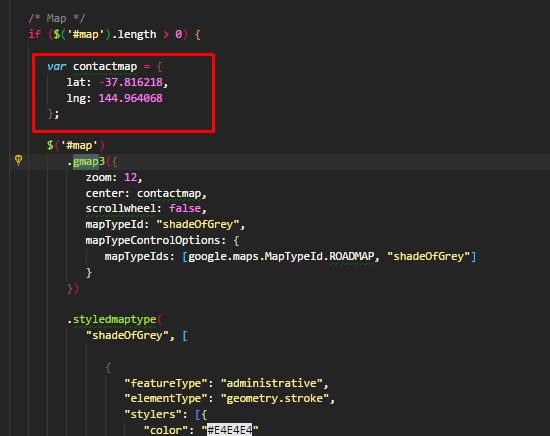
How to change Map Address?
- Please, open contact.html file >> go at the bottom and see the below screen shot.
- Then Go to main.js, file >> and find this line and see the below screen shot.
- Change your Google API key from line # 599. Here is the link how to get Google MAP API KEY
- Latitude and Longitude from line # 200

I) Sources and Credits - top
- Twitter Bootstrap
- jQuery
- FontAwesome Icons
- Jcounter, Gmap3 and Colorbox
- Images used from Pixabay, Photopin
Once again, thank you so much for purchasing this template. I'd be glad to help you if you have any questions relating to this template. I'll do my best to assist.
Tripples, tripplesworld@gmail.com